Data and privacy
The app records what a customer told your quiz and what the quiz recommended them, and nothing else. By the end of this page you know what that covers, how to answer a request about it, and what disappears on its own.
What is stored for one response
Nothing is recorded while a customer is answering. A response exists from the moment they submit, and it holds:
- What they typed on the welcome screen: the name, the age and the email address, each in its own place, and every other capture field in a separate store, which is where a phone number and your own custom fields end up, see Welcome screen.
- The email address entered at the email gate, and whether they ticked the marketing consent checkbox.
- Their answers, question by question.
- The result: the scenario their answers matched, the recommended products, and the token behind their permanent result link, see Result permalink.
- The language they took the quiz in, the date, and whether they added a product to the cart.
What is not stored is worth stating too. The app never sees a payment detail, never creates or reads a Shopify customer account, and keeps nothing about a visitor who opened a quiz without finishing it. Images you upload for a quiz live in the files of your own Shopify store rather than on the app's side.
Where you read it and export it
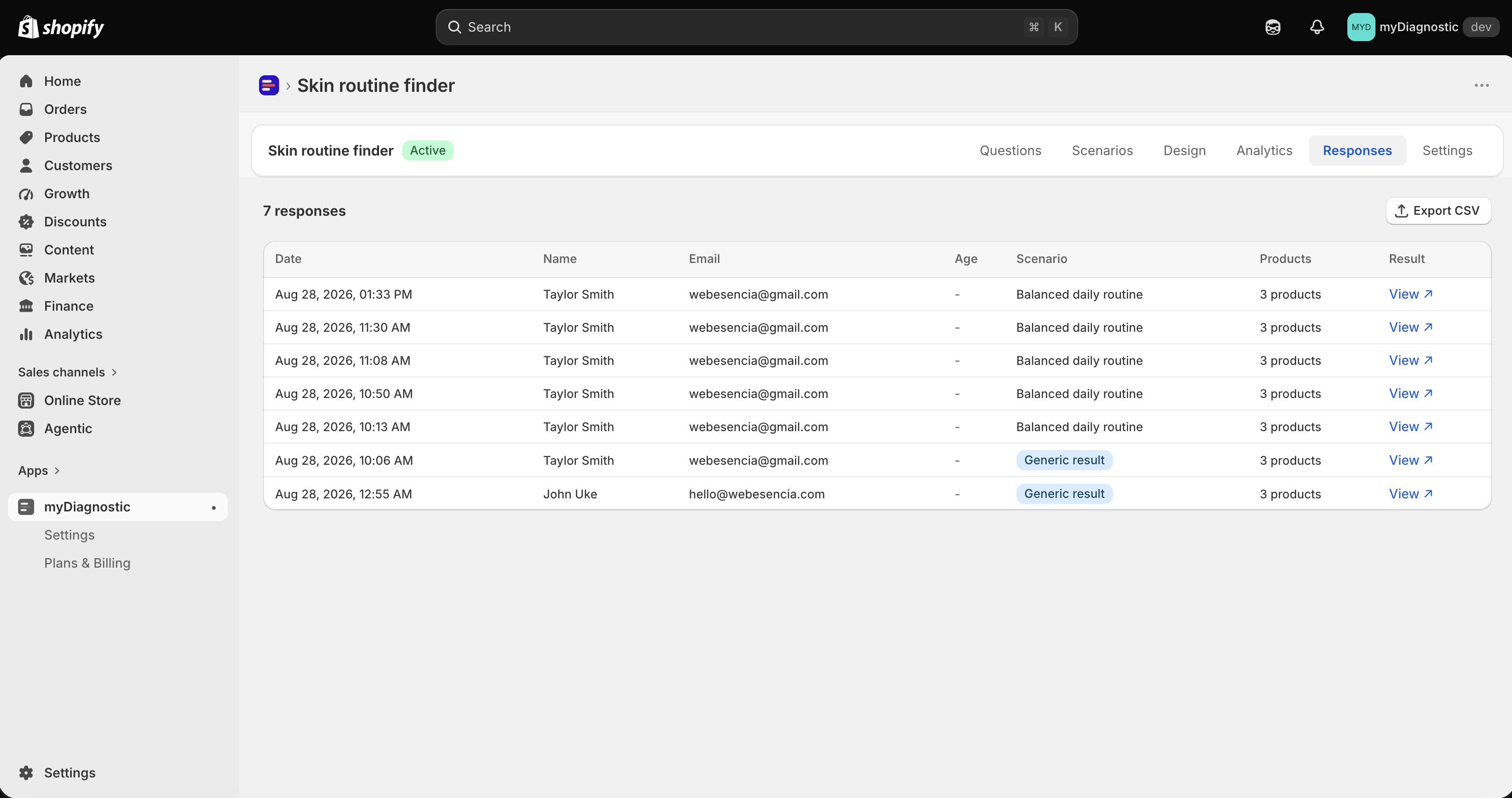
- Open the quiz and select its Responses tab.
- Select a row to open its details.
- Select Export CSV to download the whole list.
The table lists Date, Name, Email, Age, Scenario, Products and Result, the last column linking to the customer's result page. The export carries the same seven columns, with the full link in Result link.
Two things never appear in either: the phone number and your custom capture fields. They are collected, kept and usable in your copy and by your email platform, and there is no screen or export that shows them back to you. Ask for a custom field when its value is going to be used, not in order to read it later.
Removing one response
There is no delete button on a response, on purpose: the two situations that call for one are handled elsewhere, and both leave your figures consistent.
- A customer asks to be erased. Shopify forwards that request and the app clears their personal data from every response they left on your store, as described below.
- You no longer want the quiz at all. Deleting a quiz deletes its responses with it.
What the permanent result link does afterwards depends on which happened. After an erasure the link still opens, on a recommendation stripped of the details that named the customer. After the quiz is deleted, or after the app is uninstalled, the link matches nothing and shows a short Result not found page.
When a customer asks for their data
Shopify sends the request to the app. The app gathers every response left on your store by that email address, compiles them into one file, and emails it to you, at the address in the Notification email field of the app Settings, see Result email for where that field sits.
Leaving that field empty is usually harmless, since the app then writes to the account that installed it. When there is no reachable address at all, the file cannot be sent, so the app says so on screen instead: a critical banner appears on its home page and in Settings, naming the date the request arrived, and stays until you set a notification address or until thirty days have passed since the request.
Delivering it to the customer is yours to do, and the law gives you thirty days: you are the controller of this data, the app processes it for you. The app keeps a record that the request was handled, with the shop, the date, the outcome and how many responses were involved, and deliberately without a copy of the data itself.
When a customer asks to be erased
Shopify sends this one the same way, and the app acts on it directly. On every response left by that address it clears the name, the email address, the age, the language, all capture field values, the detailed answers and any order reference. The response row itself stays, carrying its quiz, its scenario, its recommended products and its date.
That is anonymisation rather than deletion, and it is the point: the person becomes unidentifiable while your response counts and your scenario figures stay true. The app's own record of past requests is scrubbed in the same pass, so an earlier data request cannot keep an address the customer asked you to forget.
When you uninstall the app
Shopify fires a deletion request forty-eight hours after an uninstall, and the app hard-deletes everything tied to your store: your quizzes, their questions and answers, your scenarios, every response, every page and every translation, along with your sessions and the app's own records for your store. Nothing is kept for a possible reinstall.
Images stay where they always were, in the files of your Shopify store.
Automatic retention after twenty-four months
A response is anonymised automatically two years after it was recorded. The job runs daily, there is nothing to switch on, and no screen shows it, which is why it is described here rather than pictured.
It clears exactly what an erasure request clears: name, email address, age, language, capture field values and detailed answers. It keeps the response, its quiz, its scenario, its recommended products and its date.
That distinction is what protects your reporting. Total responses and the Scenario distribution on the Analytics tab count rows and scenarios, so they read the same before and after. One figure does move: Emails collected counts the addresses still stored, so it falls for a period old enough to have been anonymised. Export anything you want to keep as a mailing list before then, or better, sync it to your email platform as it comes in, see Klaviyo and Mailchimp.
The app's record of the data and erasure requests it handled is kept twelve months, then deleted.
Which third parties receive customer data
Three, and each only because you connected it.
- Klaviyo and Mailchimp receive an address, a first name and the tags of the result, and only for a customer who ticked the consent checkbox on a quiz whose sync you enabled.
- Your own mail server receives the result emails, if you configured one, see Send with your own mail server. Without one, result emails leave through the app's own sending infrastructure, which is what makes them arrive at all.
Beyond that, the app talks to Shopify to read your products, their prices and their availability, and to nothing else. There is no analytics service and no tracking of your customers.
The privacy and terms links your customers see
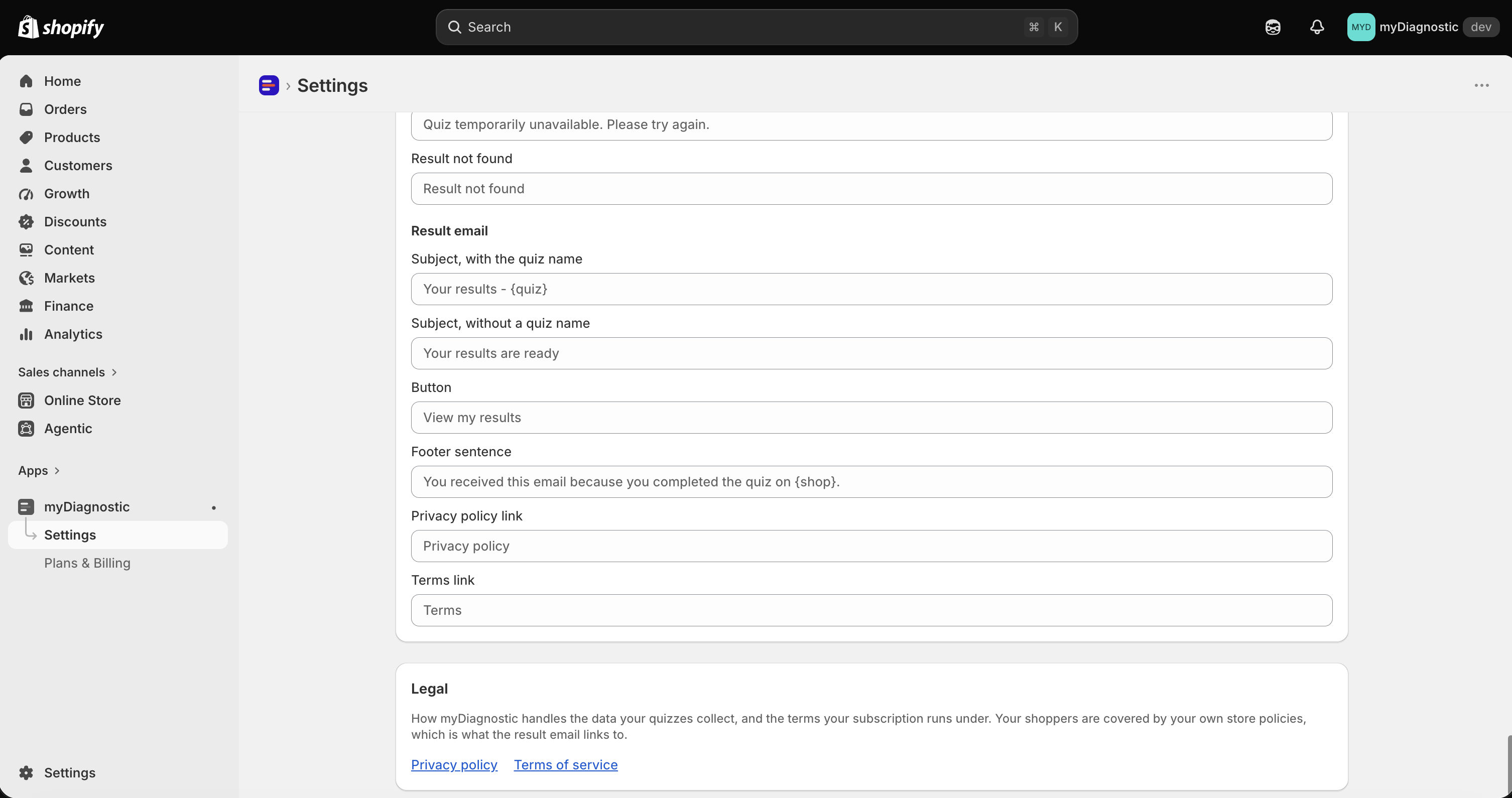
They appear in one place: the footer of the result email. The privacy link is always there and points at your Shopify policy page unless you set another address. The terms link appears only once you have given it a URL.
Both are set in the app Settings, in the Result email card, in the Legal links section, which is available on every plan precisely so that pointing customers at your own pages never depends on what you pay, see Result email.
What is yours to decide
The app collects nothing you did not ask for, so two decisions are entirely yours.
The consent sentence on the email gate is your wording. It reads I agree to receive personalized recommendations and updates. until you change it in the app Settings, in the App wording card, see App wording. It is the permission your marketing sync rests on, so make it say what you actually do with the address.
The capture fields are your choice as well, and nothing warns you about what you are asking for. Ask for what the quiz needs to recommend a product or to send the result, and never for health information or anything else people consider private: a condition, a treatment, a pregnancy, an origin, a belief, anything about a child. A quiz about skin, hair or diet can be built entirely out of preferences and habits, see Welcome screen.