Result permalink
Every time a customer finishes a quiz, the app records their result and gives it a permanent address of its own. By the end of this page you know who can open that address, what it shows them, and what it does after a downgrade, a plan limit or a purge.
Before you start
- A quiz that has recorded at least one response.
What the permalink is
The permalink is one web address per response, in the form
https://your-store.com/apps/mydiagnostic/result/<token>, where the token is a long random string
generated when the response is recorded. It is served on your own domain, so a customer opening it
stays on your online store.
One thing it is not: a link to the quiz. There is no address that opens a quiz on its own. A quiz is reached through the page of your online store that carries the app block, see Add the theme block.
Who receives it
The customer receives it in the result email, behind the button, when the quiz has that email turned on, see Result email. That is the whole point of sending the email: the customer can close the tab and still find their recommendation a week later.
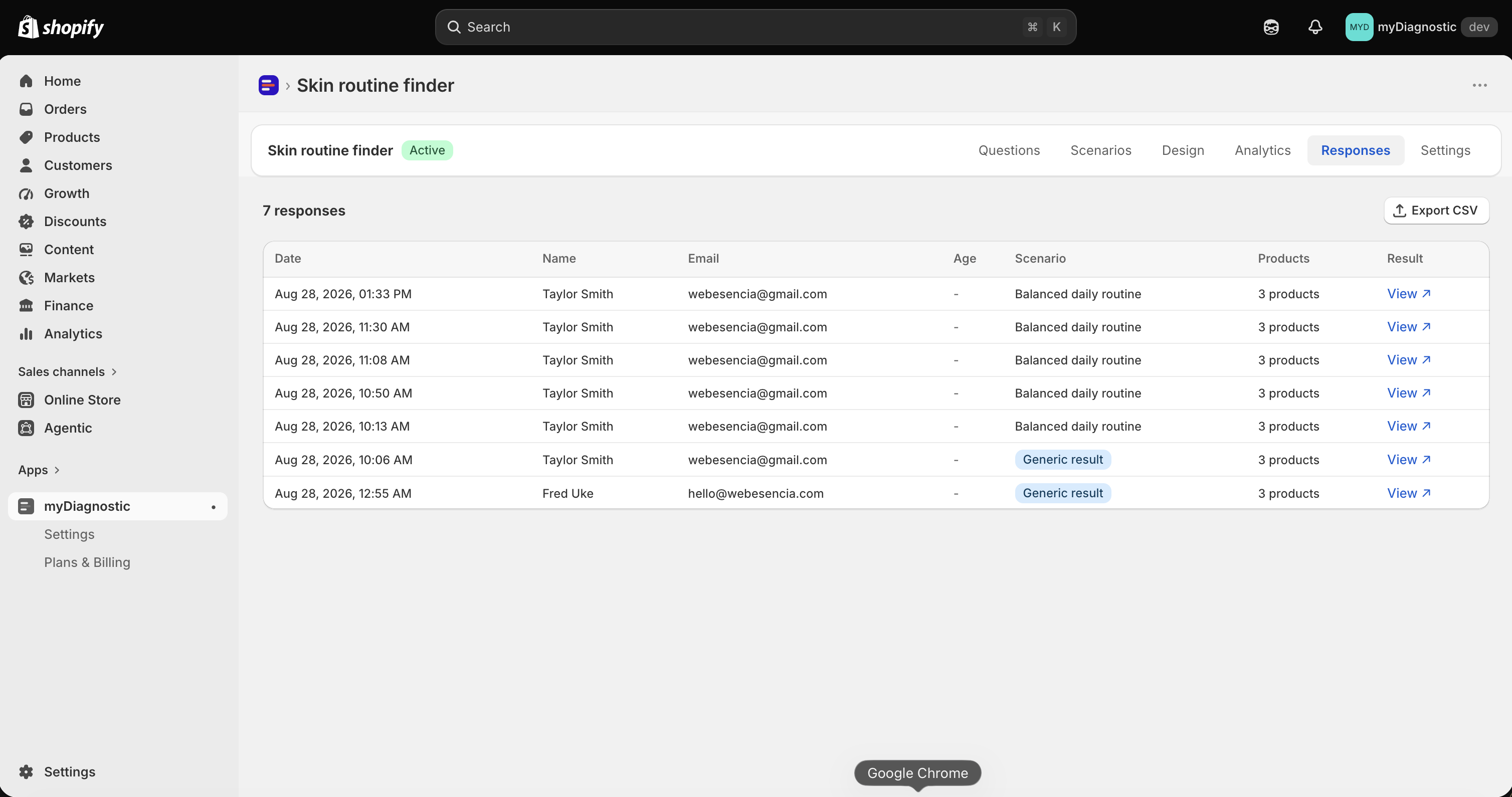
You reach the same address from the Responses tab of the quiz, in two places:
- Open the quiz and select its Responses tab.
- Select View ↗ at the end of any row, which opens that customer's result page in a new tab.
- Or select the row to open its details, then View customer page.
What the page shows
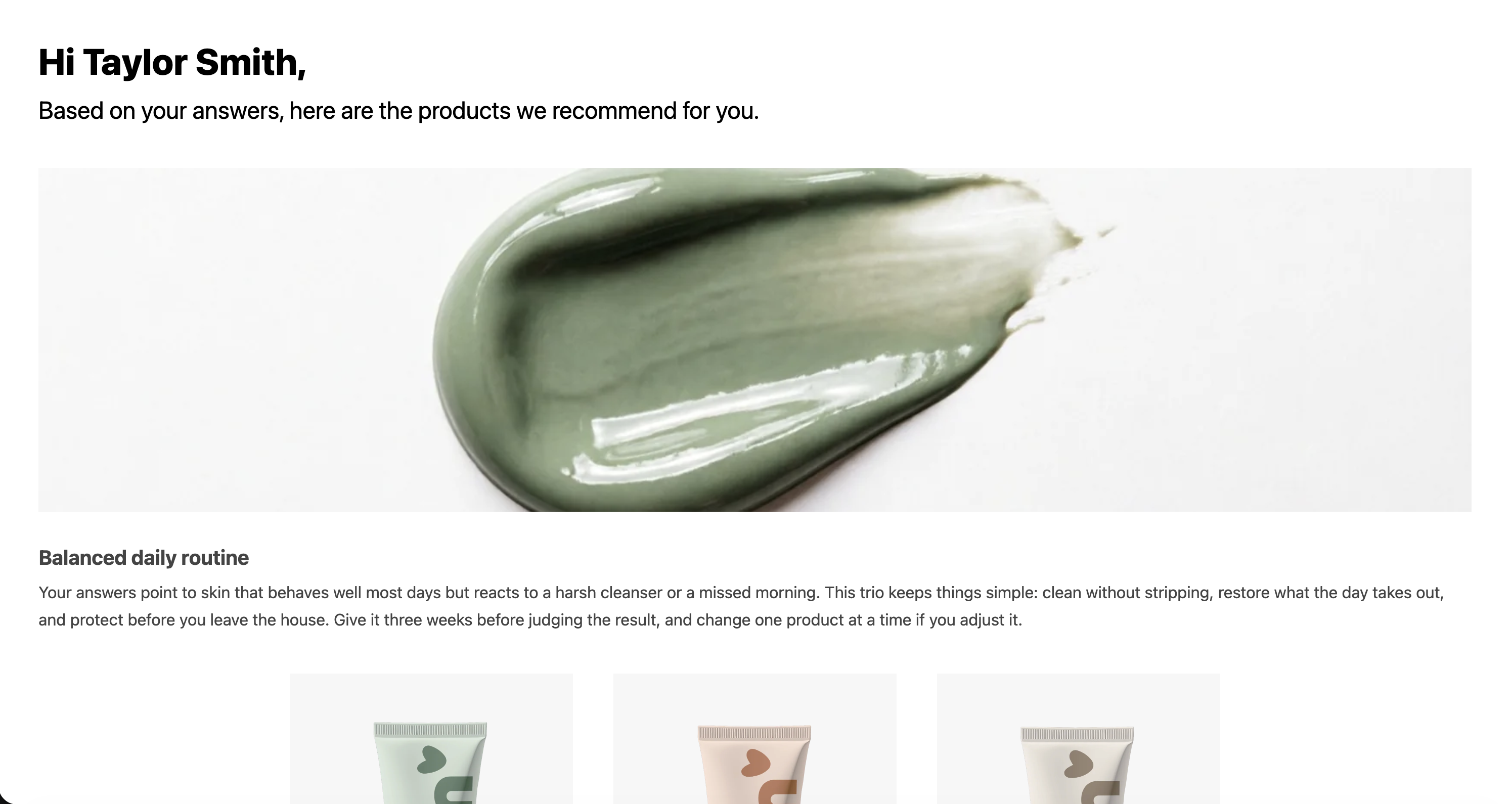
The page reopens the result as it was produced: the same products, the editorial text and the tips of the scenario their answers matched, and your result title and subtitle. It is styled like the result screen of the quiz, from the same settings, and it renders in the language the customer took the quiz in, as long as your quiz still serves that language. When it does not, the page falls back to the quiz's default language.
Two things are read again from Shopify every time the page is opened rather than stored with the response: the price of each product and whether it is still in stock. So a product you have since repriced shows its new price, and one that has sold out shows as sold out with its button disabled. The recommendation itself never changes: it is the one the customer's answers produced.
Adding products to the cart
The buttons work exactly as they do at the end of the quiz. A customer can add one product or the whole recommendation, and it lands in the cart of your online store, since the page is part of it. If you set a bundle discount code, it is applied on the way to the cart the same way.
That makes the permalink worth more than a record: it is a shopping page a customer can come back to and buy from, days after they took the quiz.
Sharing it
Anyone holding the address can open it. There is no account and no password, and the token is the only thing standing between a stranger and that page, which is why it is long and random rather than a number.
The consequence matters when you copy a link out of the Responses tab: the page can carry that customer's first name in its title, if your result copy uses it. Treat a permalink as belonging to the customer it was made for. Send it to them, do not publish it, and do not use one as the link in a campaign.
Does it expire
No. The token has no expiry date, and the page keeps working as long as its response exists.
Two things change what it shows over time.
Personal data is removed from responses two years after they were recorded, and straight away from
any response a customer asked you to erase. The permalink survives both: the page still opens on the
recommendation, without the details that named the customer, so a title written as Hi {name},
reads as Hi.
If the response itself is gone, which is what happens to everything when your store's data is deleted after you uninstall the app, the address matches nothing and the page reads Result not found. The same message appears when a link has been edited or truncated on the way. You can change its wording for every language you serve, see App wording.
Over your monthly response limit
Opening a permalink costs you nothing. The monthly counter moves when a customer completes a quiz, never when a result is read, so an old result is not a new response.
That is why the two behave differently once a store on the Free plan reaches its limit: the quiz stops accepting new answers and shows customers that it is unavailable, while every permalink already issued keeps opening normally. Customers who already have their result are never cut off by your plan, see Plans and quotas.
After a downgrade below Basic
Scenario editorial needs the Basic plan or above. Drop to Free and new results come out generic, with the products and none of the editorial.
Permalinks issued before that keep their scenario text and their tips. The rule behind it is the same as the one above: a plan gates the production of new results, not the reading of results a customer already received. Move back to Basic and new results carry their editorial again, see Result scenarios.